Orphaned hardware
Your JuiceBox still charges. The app is gone.
Enel X Way North America shut down in October 2024. The hardware on your wall was not bricked -- the software behind it was switched off. Here is exactly what you lost, and whether to replace it.
By Sawyer V. · Published October 7, 2026
How this page is funded: we earn a commission if you buy through our Amazon links, at no extra cost to you. It does not change what we recommend, and we say plainly when the honest answer is to buy nothing. Full disclosure.
The verdict first, because this is the question people arrive with: if your JuiceBox charges your car and you do not use scheduling, keep it and do nothing. If you are on a time-of-use rate, or you want to see what charging costs, or the unit has begun throwing faults you cannot get support for, replace it with a connected 40 or 48 amp charger from a company that still exists. Our default pick for that is a 48 A unit with free app scheduling and no subscription.
What actually happened
Enel X Way North America announced in October 2024 that it was leaving the United States and Canadian markets, citing the financial environment. Customer service ended effective immediately and the mobile app was pulled from the app stores. The hardware was not remotely disabled -- but a connected charger with nothing to connect to is a plain charger, and that is what tens of thousands of JuiceBoxes became.
| Function | Status |
|---|---|
| Charging the car when plugged in | Still works |
| Choosing the current with the physical configuration | Set at install; unchanged |
| The Enel X Way app | Removed from the app stores |
| Scheduled and delayed charging through the app | Gone |
| Energy and cost reporting | Gone |
| Remote start and stop | Gone |
| Firmware updates | Gone |
| Warranty claims and customer service | Gone |
| Utility demand-response program enrollment | Gone |
If you want to keep it: the honest options
- Schedule in the car, not the charger. Every EV sold in the last several years can set a departure time or a charging window itself. This replaces the single feature most JuiceBox owners miss, for nothing. Time-of-use charging explains how to line it up with your rate.
- Measure at the panel instead of in the app. A whole-home energy monitor with a sensor on the EV circuit reports what the charger actually used, which the app used to do and did less precisely.
- Do not expect third-party apps to be a full fix. Some owners have had partial success pairing a JuiceBox with other software. It is unsupported, it can stop working after any change, and nothing restores the warranty.
- Keep the physical current setting as it is. If an electrician set it to match your circuit, that setting is still protecting the circuit. Do not change the breaker and assume the charger will follow.
What to replace it with, and who each pick is for
| What you lost | Buy this | Who should skip it |
|---|---|---|
| Scheduling and energy reporting, cheaply | A 48 A connected charger with a free app and no subscription | Anyone who schedules in the car and will never open an app |
| A plug-in unit you can take with you | A 40 A plug-in connected charger on a NEMA 14-50 | Hardwired installs where the 14-50 outlet does not exist |
| An established brand with long support history | A 48 A unit from a company with a North American service operation | Buyers for whom price is the deciding factor |
| Nothing -- you only ever plugged it in | Nothing. Keep the JuiceBox. | Owners on a time-of-use rate, who are losing real money |
One lesson worth taking from this: the feature that disappeared was the cloud feature. Certification, enclosure rating, cable length and current rating are properties of the hardware and cannot be switched off from a head office. Weight them accordingly next time. Do you need a smart EV charger argues the same point from the other direction.
If you are keeping the JuiceBox but the circuit is being reworked, note that a replacement does not have to match the old unit's amperage. Size it to the circuit and the car, not to what was there before: how many amps do you need.
Chargers that replace what the app did
Connected units with free scheduling and no subscription, from companies still operating in North America. Prices are live from Amazon and carry the date they were read.
1. A first charger, hardwired
Emporia Level 2 EV Charger (Classic)
Emporia · J1772 · 48 A / 11.5 kW · 25 ft cable
The safe default for a first home charger: 48 amps hardwired, a genuinely long cable, a NEMA 4 outdoor-rated case, and no subscription attached to the app.
What is good
- 48 A hardwired is the fastest tier most homes can realistically support
- 25 ft of cable reaches across a two-car garage without a fight
- NEMA Type 4 enclosure is rated for outdoor mounting
- Energy monitoring in the app with no subscription
What is not
- Drops to 40 A if you use the NEMA 14-50 plug rather than hardwiring
- The app is the only way to change the amperage setting
| Maximum output | 48 A / 11.5 kW at 240 V (hardwired) |
|---|---|
| Plug-in output | 40 A with the NEMA 14-50 plug |
| Connector | SAE J1772 |
| Cable | 25 ft |
| Enclosure | NEMA Type 4, indoor or outdoor |
| Certification | UL listed, Energy Star |
| Warranty | 3 years |
Skip this if: Skip it if you want a unit with no app or network connection at all. The Grizzl-E Classic is the simpler machine.
Specifications above are the manufacturer’s published figures. Source: Emporia Energy. We have not tested this unit — see how we pick.
2. Grizzl-E toughness, with an app
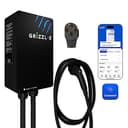
Grizzl-E Classic Connect
United Chargers · J1772 · 40 A / 9.6 kW · 25 ft cable
The next-generation Grizzl-E: 40 A on a NEMA 14-50, a 25 ft cable, a UL Type 4 indoor/outdoor rating -- and, unlike the Classic, Wi-Fi and the Grizzl-E Connect app. Sold with a J1772 or NACS cable.
What is good
- 25 ft cable, a foot longer than the Classic Extreme Edition's
- Wi-Fi app with schedules and charging statistics, which the Classic deliberately lacks
- UL/cUL listed, with a published file number
- Rated to run from -22 F to 122 F
What is not
- 40 A ceiling, with no hardwired 48 A version
- Sold with a NEMA 14-50 plug; the Classic's 6-50 option is not among the Connect listings we found
- The app needs 2.4 GHz Wi-Fi where the charger is mounted
| Maximum output | 40 A / 9.6 kW at 240 V (the maker lists 10 kW) |
|---|---|
| Adjustable | 16 A to 40 A |
| Connector | SAE J1772 or NACS, chosen at purchase |
| Cable | 25 ft (7.6 m) |
| Plug | NEMA 14-50 |
| Enclosure rating | UL Type 4, indoor and outdoor |
| Operating temperature | -22 F to 122 F |
| Size | 10.25 x 6.25 x 3.75 in |
| Connectivity | Wi-Fi (2.4 GHz) and the Grizzl-E Connect app |
| Certification | UL/cUL, file E510712 |
| Warranty | 3 years; 5-year warranty sold separately |
Skip this if: Skip it if you wanted a Grizzl-E precisely because it has no app -- the original Classic is still the no-software choice -- or if you want 48 A. The Classic Connect is a 40 A plug-in unit.
Specifications above are the manufacturer’s published figures. Source: United Chargers. We have not tested this unit — see how we pick.
3. Homes with an uncertain panel
ChargePoint Home Flex
ChargePoint · J1772 · 50 A / 12 kW · 23 ft cable
The most adjustable unit here. It can be set anywhere from 16 A to 50 A, which makes it the one to buy when you do not yet know what your panel will allow.
What is good
- Six selectable amperage settings from 16 A to 50 A
- Sold in both hardwired and NEMA 14-50 versions
- Rated for indoor or outdoor installation
- The app is mature and does not require a subscription
What is not
- 23 ft is a foot shorter than the longest cables in this group
- The 50 A setting needs a bigger circuit than most panels have spare
| Maximum output | 50 A / 12 kW at 240 V |
|---|---|
| Amperage settings | 16, 24, 32, 40, 48 or 50 A |
| Connector | SAE J1772 |
| Cable | 23 ft |
| Installation | Hardwired or NEMA 14-50 |
| Certification | UL listed, Energy Star |
| Warranty | 3 years |
Skip this if: Skip it if your circuit is already fixed and you just want the cheapest safe 40 A unit. You are paying for flexibility you will not use.
Specifications above are the manufacturer’s published figures. Source: ChargePoint, ChargePoint. We have not tested this unit — see how we pick.
FAQ
Questions people actually ask
Does a JuiceBox still work after the Enel X Way shutdown?
Can I still schedule charging without the JuiceBox app?
Should I replace my JuiceBox?
Is it safe to keep using a JuiceBox with no firmware updates?
Sources
Where these numbers come from
- Enel X Way North America exits Canadian and U.S. markets, impacting JuiceBox customers — Drive Tesla CanadaPublished 2024-10-02. Quotes the company: "the JuiceBox will continue to be able to charge vehicles physically, however all associated software services will be discontinued"; the mobile app was removed from the app stores and customer service ended effective immediately. Read 2026-10-07.
- Enel X Way JuiceBox charger customers are cut off and left in the dark — InsideEVsReporting on the Enel X Way North America closure: the chargers keep charging but all software and connected services were switched off, and the Enel X Way app was removed from the app stores. Read 2026-10-07.
- Electric Vehicle Charging Infrastructure: AC Level 2 equipment — U.S. Department of Energy, Alternative Fuels Data CenterAC Level 2 runs at 240 V in homes, delivers 2.9 to 19.2 kW, and adds roughly 25 miles of range per hour of charging. Read 2026-10-07.
Read next
Related reading
- Your EV charger is not working: what to checkThe six usual causes of a charge that will not start, in the order worth checking them.
- Do you need a smart EV charger?What an app adds over a plain charger, which features your car already has, and when to skip it.
- Smart EV chargers: which ones earn the appWhich Wi-Fi chargers earn their price, and why your car may already do the useful part.
- Charging at night on a time-of-use rateHow time-of-use rates work, how to schedule charging, and how to check the switch pays.
- EV charger warranties, comparedPublished warranty terms side by side, what they typically exclude, and why it matters here.