Troubleshooting
EV charger not connecting to Wi-Fi
Nine times out of ten this is not a broken charger. It is a 2.4 GHz radio being offered a 5 GHz network, in a garage, through a wall.
By Sawyer V. · Published October 11, 2026
How this page is funded: we earn a commission if you buy through our Amazon links, at no extra cost to you. It does not change what we recommend, and we say plainly when the honest answer is to buy nothing. Full disclosure.
The verdict: before you return anything, check whether your charger is a 2.4 GHz-only device being handed a 5 GHz network. It almost certainly is, because nearly every home EV charger uses 2.4 GHz for range and penetration, and nearly every router made in the last few years presents both bands under a single network name. Split the bands or stand up a 2.4 GHz guest network, pair the charger next to the unit with your phone's mobile data switched off, and the large majority of these failures resolve. Everything else below is for the rest.
Why this happens so consistently
An EV charger sits in a garage -- the room furthest from the router, often behind a masonry wall, sometimes in a detached building. 2.4 GHz is the sensible radio choice for that: it travels further and penetrates better than 5 GHz. The trade is that it is slower, which does not matter at all for a device sending a few kilobytes of charging status.
The problem is on the router side. Band steering, or a single SSID covering both bands, means your phone is probably on 5 GHz when you run the setup. The app passes the network name and password to the charger, the charger scans, and the network it was told to join is one it physically cannot see. Most apps report that as a wrong password or a generic failure, which sends people looking in the wrong place.
The fixes, in the order worth trying
| # | Try this | Why it works |
|---|---|---|
| 1 | Stand next to the charger with your phone while pairing | Setup usually runs over a short-range link from the charger itself |
| 2 | Turn your phone's mobile data off during setup | Stops the phone silently routing around the charger's temporary network |
| 3 | Confirm your password has no unusual characters | Some chargers mishandle quotes, backslashes and non-ASCII characters |
| 4 | Create a 2.4 GHz-only guest network and join the charger to that | Guarantees the charger is offered a band it can see |
| 5 | Or temporarily disable band steering / split the SSIDs | Same effect, on the main network |
| 6 | Set the 2.4 GHz channel to 1, 6 or 11 and the width to 20 MHz | Avoids overlap and the wide-channel modes some radios reject |
| 7 | Move the router, or add a mesh node or access point near the garage | Fixes the actual problem if signal is genuinely marginal |
| 8 | Power-cycle the charger at the breaker, then re-run setup | Clears a half-finished provisioning state |
| 9 | Check the maker's status page before blaming your network | A charger cannot finish setup if the cloud it registers against is down |
What a connected charger is actually for
Worth asking before you spend a second evening on this. The features Wi-Fi delivers are scheduling, energy reporting, remote start and stop, and firmware updates. Of those, scheduling is the one most people actually want -- and every EV sold in recent years can schedule a departure time or a charging window itself, with no charger involvement at all. Time-of-use charging covers lining that up with your rate.
Energy reporting is the other common motive, and a charger's app is not the best tool for it anyway: it reports what it delivered to the car, not what the circuit drew from your meter. An energy monitor with a sensor on the EV circuit measures the thing you are billed for. Emporia Vue 3 review.
When to stop
| Situation | What to do |
|---|---|
| Charger charges fine, app will not pair | Schedule in the car and move on. Nothing is broken. |
| Detached garage, no signal at all | Add a mesh node or access point, or accept no app |
| You only wanted scheduling | Use the car. You lose nothing. |
| You need reporting | Measure the circuit with a monitor instead |
| Unit is faulting as well as not pairing | That is a hardware problem: EV charger not working |
| Buying next time | Consider a charger with no app at all |
And the longer-term point: a charger whose features depend on a manufacturer's cloud can lose them. That is not hypothetical -- see what happened to JuiceBox owners. If the Wi-Fi fight has soured you on connected chargers generally, best EV charger without an app is the deliberate opposite, and do you need a smart EV charger argues both sides.
The connected one, and the deliberate opt-out
A Grizzl-E with the app and one without it, plus the monitor that reports the circuit rather than the car. Live Amazon prices with the date they were read.
1. Harsh weather and no app
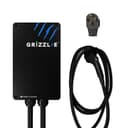
Grizzl-E Classic
United Chargers · J1772 · 40 A / 9.6 kW · 24 ft cable
A cast-aluminum box with no app, no account and no firmware to update. If you want a charger that behaves like an appliance, this is the one.
What is good
- Cast aluminum NEMA 4 / IP67 enclosure, built for outdoor mounting
- No app, no account, no network dependency
- Amperage is set with physical switches, not software
- Protections for over-current, over-voltage, ground fault and over-temperature
What is not
- 40 A ceiling, slower than the 48 A units if your panel can take more
- No scheduling, so off-peak charging has to be set in the car
- The cold-flexible 24 ft cable is only on the Extreme Edition
| Maximum output | 40 A / 9.6 kW at 240 V |
|---|---|
| Adjustable | 16, 24, 32 or 40 A |
| Connector | SAE J1772 |
| Cable | 24 ft on the Extreme Edition |
| Enclosure | Cast aluminum, NEMA 4 / IP67 |
| Certification | UL certified |
| Warranty | 3 years |
Skip this if: Skip it if you want scheduled charging or energy tracking in an app. The Classic deliberately has neither.
Specifications above are the manufacturer’s published figures. Source: United Chargers, InsideEVs. We have not tested this unit — see how we pick.
2. Grizzl-E toughness, with an app
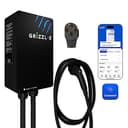
Grizzl-E Classic Connect
United Chargers · J1772 · 40 A / 9.6 kW · 25 ft cable
The next-generation Grizzl-E: 40 A on a NEMA 14-50, a 25 ft cable, a UL Type 4 indoor/outdoor rating -- and, unlike the Classic, Wi-Fi and the Grizzl-E Connect app. Sold with a J1772 or NACS cable.
What is good
- 25 ft cable, a foot longer than the Classic Extreme Edition's
- Wi-Fi app with schedules and charging statistics, which the Classic deliberately lacks
- UL/cUL listed, with a published file number
- Rated to run from -22 F to 122 F
What is not
- 40 A ceiling, with no hardwired 48 A version
- Sold with a NEMA 14-50 plug; the Classic's 6-50 option is not among the Connect listings we found
- The app needs 2.4 GHz Wi-Fi where the charger is mounted
| Maximum output | 40 A / 9.6 kW at 240 V (the maker lists 10 kW) |
|---|---|
| Adjustable | 16 A to 40 A |
| Connector | SAE J1772 or NACS, chosen at purchase |
| Cable | 25 ft (7.6 m) |
| Plug | NEMA 14-50 |
| Enclosure rating | UL Type 4, indoor and outdoor |
| Operating temperature | -22 F to 122 F |
| Size | 10.25 x 6.25 x 3.75 in |
| Connectivity | Wi-Fi (2.4 GHz) and the Grizzl-E Connect app |
| Certification | UL/cUL, file E510712 |
| Warranty | 3 years; 5-year warranty sold separately |
Skip this if: Skip it if you wanted a Grizzl-E precisely because it has no app -- the original Classic is still the no-software choice -- or if you want 48 A. The Classic Connect is a 40 A plug-in unit.
Specifications above are the manufacturer’s published figures. Source: United Chargers. We have not tested this unit — see how we pick.
3. Circuit-level detail
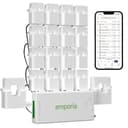
Emporia Vue 3 home energy monitor
Emporia · In-panel sensors
Clamps onto your mains and up to 16 individual circuits, so you can see exactly what the EV charger draws and how much headroom your panel really has. Pairs with Emporia's own charger to charge from surplus solar.
What is good
- Up to 16 circuit sensors, so the EV circuit gets its own exact reading
- Wired Ethernet as well as Wi-Fi, which matters inside a metal panel
- Pairs with the Emporia EV charger to charge from surplus solar
- Shows real panel headroom -- useful before deciding on a charger's amperage
What is not
- Sensors go inside the panel, which is electrician territory
- Routing up to 16 clamps is fiddly in a crowded panel
- Only as useful as the time you spend in the app
| Mains sensors | 2 x 200 A |
|---|---|
| Branch circuit sensors | Up to 16 x 50 A |
| Connectivity | 2.4 GHz Wi-Fi, plus 10/100 wired Ethernet |
| Solar | Monitors net metering without extra equipment |
| 3-phase homes | A separate 3-phase/4-wire model is sold |
| Certification | UL certified |
| Warranty | 1 year |
Skip this if: Skip it if you only want a whole-home total. Sixteen circuit sensors is a lot of hardware to route through a panel for one number.
Specifications above are the manufacturer’s published figures. Source: Emporia Energy, Emporia Energy, Excess Solar, Emporia Energy, 3-phase model. We have not tested this unit — see how we pick.
FAQ
Questions people actually ask
Why won't my EV charger connect to Wi-Fi?
Do EV chargers use 2.4 GHz or 5 GHz?
Does WPA3 stop an EV charger connecting?
Do I need Wi-Fi on an EV charger at all?
Should I return a charger that won't connect?
Sources
Where these numbers come from
- Electric Vehicle Charging Infrastructure: AC Level 2 equipment — U.S. Department of Energy, Alternative Fuels Data CenterAC Level 2 runs at 240 V in homes, delivers 2.9 to 19.2 kW, and adds roughly 25 miles of range per hour of charging, on the J1772 or J3400 (NACS) connector. Read 2026-10-11.
- Grizzl-E Ultimate 48 — United ChargersSKU GRS-HW-25NACS48-B, model GRS-077-W-HW-25N48-A-GB, aluminum enclosure, origin Canada, 11.00 kg / 24.25 lbs, AC Level 2, connector J1772 and NACS, max power 48 A / 11.5 kW, hardwire only, UL Type 4 indoor/outdoor, OCPP, UL E510712, Wi-Fi 2.4 GHz and mobile app, adjustable current 40A/32A/24A/16A, 25 ft cable, enclosure 10.25 x 6.25 x 3.75 in, -30 C to +50 C (-22 F to 122 F). Read 2026-10-11.
- Grizzl-E Ultimate — United ChargersSKU GRU-077-W-HW-25DJ80-A-GB, aluminum enclosure, origin Canada, 12.00 kg / 26.46 lbs, AC Level 2, connector J1772 and NACS, max power 80 A / 19.2 kW, hardwire only, UL Type 4 indoor/outdoor, OCPP, certifications UL E510712 and Energy Star, Wi-Fi 2.4 GHz and mobile app, adjustable current 80A/64A/56A/48A/40A/32A/24A/16A, 25 ft cable, enclosure 10.25 x 6.25 x 3.75 in, -30 C to +50 C (-22 F to 122 F). Read 2026-10-11.
Read next
Related reading
- Your EV charger is not working: what to checkThe six usual causes of a charge that will not start, in the order worth checking them.
- Do you need a smart EV charger?What an app adds over a plain charger, which features your car already has, and when to skip it.
- The best EV chargers with no app and no WiFiChargers with no app, no account and nothing to update, and why that is a feature.
- Your JuiceBox still charges. The app is gone.What the Enel X Way shutdown did and did not break, and the replacements worth buying if scheduling matters to you.
- Charging at night on a time-of-use rateHow time-of-use rates work, how to schedule charging, and how to check the switch pays.